Advantages of fractal image compression
Fractal compression describes a picture differently from JPEG or PNG, and this gives it properties that those formats do not have. This page describes each of them with pictures decoded by the FIF2 reference codec.
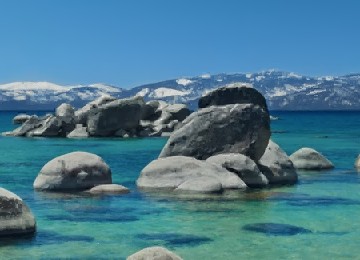
All figures on this page come from the same photograph of a lake shore. The measurements use PSNR, the usual objective measure of how close a decoded picture is to the original, in decibels (dB). Higher is better; a difference of one or two decibels is usually visible when two pictures are shown side by side.
1. Decoding at any resolution
An ordinary image file stores a fixed number of pixels. To show the picture larger, a program must calculate the missing pixels from their neighbours. The result is soft: edges turn into ramps, and fine texture turns into smooth patches.
A fractal file stores no pixels. Its instructions describe which region is copied into which, relative to the size of the picture. The decoder can therefore carry out the same instructions on a finer grid, for example with twice as many pixels in each direction. It does not enlarge a small picture; it reconstructs the picture directly at the larger size.
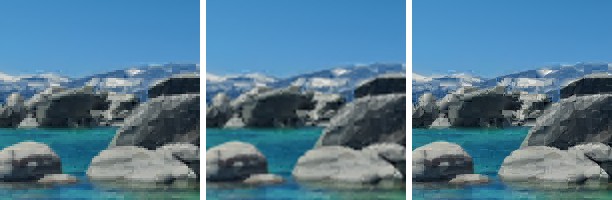
fif decode --scale 2. The
edges of the rocks and the snow line stay sharp.The additional detail comes from other parts of the same picture, so it looks natural but is not a recording of the real scene. Factors of two to three give the best results; at four times and above, the block structure of the code can become visible. FIF2 decodes at any whole factor up to 16, and at any exact output size.
The same method works in the other direction. FIF2 can reconstruct a picture directly at ½, ¼ or ⅛ of its size, which takes proportionally less time and memory. On a 4096 × 3646 picture, decoding at ⅛ size is about 17 times faster than a full decode. This is useful for previews and image browsers.
2. Good pictures at small file sizes
When a JPEG file must be very small, the encoder keeps only the average colour of each 8 × 8 block. The picture breaks up into visible squares and bands. In a fractal file, each block is still a copy of real structure from another part of the picture, even when few bits are available. Edges and textures remain recognisable.
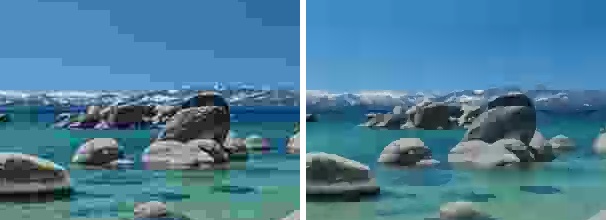
The advantage holds over a range of file sizes. The following measurement uses an 8.3-megapixel photograph of a tulip field and compares FIF2 with mozjpeg, one of the most efficient JPEG encoders:
| File size | FIF2 | JPEG (mozjpeg) |
|---|---|---|
| 180 KB | 28.3 dB | 24.6 dB |
| 250 KB | 29.0 dB | 27.6 dB |
| 325 KB | 30.0 dB | 29.0 dB |
| 510 KB | 31.1 dB | 31.1 dB |
At 180 KB, FIF2 is almost 4 dB better than JPEG. FIF2 also reaches sizes that JPEG cannot produce: 45 KB at 25.5 dB. WebP, measured on the same photograph, is better than both at every size in the table.
3. Every part of the file is a picture
A FIF2 file is ordered so that any beginning of it can be decoded. The first part holds the size and mean brightness of every block. The second part holds the rest: which domain block to copy, its orientation and its contrast. A program that has received only the first half of a file can already show a complete, coarse picture. Each further byte makes it sharper.
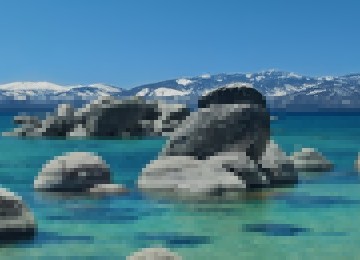
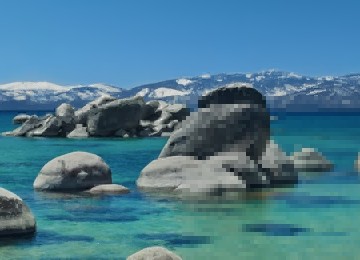
This is not a separate preview but the picture itself, read in part. A
viewer on a slow connection can show the picture after half of the download. A
server can deliver a lighter version of a picture by sending fewer bytes of the
same file; fif info states how many bytes the coarse version
needs. A file that is cut short still decodes, at lower quality.
4. Fast and simple decoding
The encoder does the difficult work: it searches for matching blocks. The decoder only copies blocks, reduces them and adjusts brightness and contrast, about ten times over. It needs no frequency transforms.
The FIF2 reference decoder reconstructs 80 to 120 megapixels per second on a current desktop processor, which is comparable to WebP. The file format is documented completely, so the decoder can be implemented from the specification alone.
5. Independent tiles
FIF2 divides every picture into tiles of 256 or 512 pixels. A tile never copies from another tile. As a result:
- encoder and decoder process all tiles at the same time and use all processor cores;
- a program can decode one region of a very large picture, such as a map or a satellite image, without decoding the rest;
- damage stays local: a corrupted byte affects one tile, and a checksum in the file reports it.
6. Detail where the picture needs it
A fractal code adapts its block size to the picture. Calm regions such as the sky are covered by large blocks with one brightness or a gentle gradient. Busy regions are divided into small blocks, each copied from similar structure elsewhere in the picture. This makes the method well suited to natural scenes with repeated texture: landscapes, foliage, rock and water.
Limitations
- Quality ceiling. A block can only be as accurate as the best matching region in the picture. At high quality settings, the quality levels off; on the tulip photograph near 32.5 dB. For archiving at the highest quality, JPEG or a lossless format is the better choice.
- Modern codecs. WebP and newer formats such as AVIF are more efficient than FIF2. FIF2 competes with JPEG and is better at low data rates.
- Encoding time. Encoding takes longer than decoding: 0.5 to 3.5 seconds for an 8-megapixel photograph, depending on the effort setting.
- Picture types. FIF2 codes greyscale and colour pictures with 8 bits per channel, without transparency.